
Cloud Backup Failures: Why Microsoft 365 and AWS Data Still Gets Lost
Cloud platforms such as Microsoft 365 and Amazon Web Services are designed for high availability and resilience. I regularly remind organizations, however, that availability is not the same as recoverability. Many learn this distinction only after a ransomware incident, mass deletion, misconfiguration, or account compromise exposes a critical assumption: they believed the cloud provider was backing up their data for them.
In my experience, cloud backup failures are rarely caused by a single technical flaw. They are far more often the result of misunderstandings around responsibility, incomplete backup architectures, and recovery processes that were never tested. Understanding where these failures occur is the first step toward preventing them.
Why the Shared Responsibility Model Causes Confusion
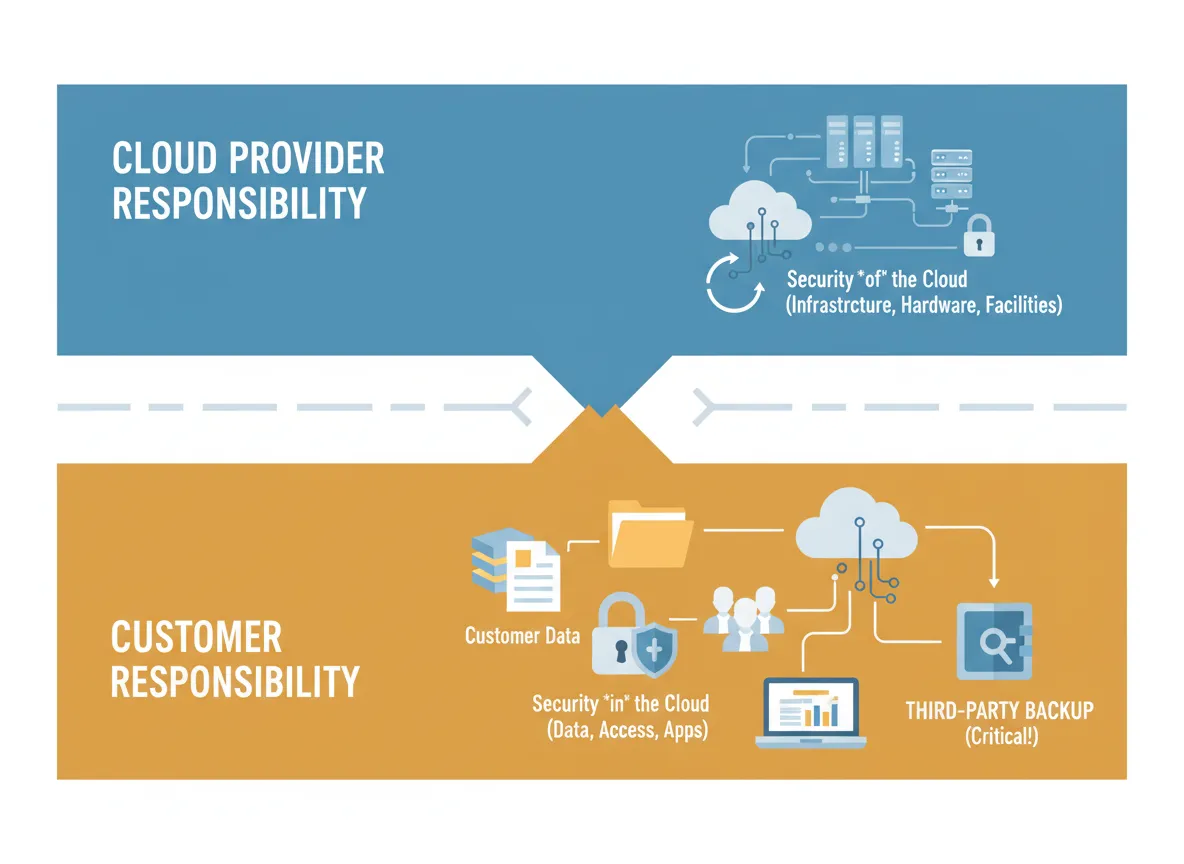
Most cloud backup failures begin with a misunderstanding of the shared responsibility model. Both Microsoft and AWS are clear about their roles. They are responsible for the availability and security of the cloud infrastructure itself. Customers are responsible for the security, protection, and recoverability of their data within that infrastructure.
Backup and long-term data retention fall squarely on the customer side. When incidents occur, organizations often discover too late that native retention features are limited, deletions replicate instantly, backup coverage was incomplete, or recovery procedures were never validated. These gaps are not bugs in the platform. They are design assumptions that were never addressed.
Where Microsoft 365 “Built-In Protection” Falls Short
Microsoft 365 provides redundancy and short-term retention, but I do not consider it a true backup solution. I see several failure scenarios repeatedly.
Deleted data often expires permanently once retention windows close, leaving no recovery option without third-party backups. Ransomware can encrypt files that synchronize across OneDrive and SharePoint before anyone notices, rendering version history ineffective. Compromised admin accounts can trigger mass deletion of users, mailboxes, or sites with limited rollback capability. Retention policies are frequently misunderstood, with retention being treated as backup even though it does not provide clean, point-in-time restores across workloads. I also see consistent coverage gaps, especially around Teams chats, private channels, Planner data, and other services that are only partially protected or excluded entirely.
The core issue is simple. Microsoft ensures service uptime. It does not ensure restoration of your business data to a known good state.
Why AWS Backups Fail When Architecture Is Weak
AWS offers powerful backup and replication tools, but nothing is enabled by default. I see flexibility become a liability when governance is weak or assumptions are made.
Snapshots for EC2, EBS, RDS, and EFS require explicit configuration, and critical workloads are often missed due to tagging errors or oversight. Backups are frequently stored in the same AWS account as production systems, which means a single credential compromise can delete everything at once. Without immutability controls such as Backup Vault Lock, backups can be altered or destroyed. Many organizations rely on region-only protection, which fails during regional outages or disasters. Restore procedures are often untested, and during an incident teams discover dependencies that prevent timely recovery.
AWS provides the tools. Recoverability depends entirely on how those tools are designed and governed.
Why Cloud Backup Failures Are Increasing
Several trends are driving the rise in cloud backup failures. Ransomware groups increasingly target cloud admin accounts. Organizations overestimate native platform protections. Cloud adoption often outpaces governance maturity. Cost optimization efforts remove redundancy. Backup ownership is frequently unclear, with no one accountable for verification and testing.
In many incidents I review, backups technically existed, but they were incomplete, inaccessible, or unusable within required recovery timelines. From a business perspective, that is no different than having no backups at all.
The Real Business Impact of Cloud Backup Gaps
Cloud backup failures extend far beyond IT disruption. I see prolonged operational downtime, permanent loss of email and files, regulatory exposure under frameworks such as HIPAA or state privacy laws, reputational damage, and costly forensic and recovery efforts. In regulated industries, these failures escalate quickly into compliance and legal issues.
How I Help Organizations Prevent Cloud Backup Failures
To reduce this risk, I focus on a few core practices. I implement independent, third-party backups for Microsoft 365 that cover Exchange, OneDrive, SharePoint, Teams, and Groups, and I ensure those backups are stored outside Microsoft’s native environment. I enforce immutability wherever possible so backups cannot be deleted or altered, even by administrators. In AWS, I separate backup accounts and credentials, restrict deletion permissions, and require strong authentication controls. I regularly audit what is and is not being backed up, validate retention against legal and operational needs, and pay close attention to edge services and integrations. Most importantly, I schedule routine restore testing and document recovery procedures, escalation paths, and recovery objectives.
Conclusion: Recoverability Is a Business Responsibility
Cloud platforms are reliable, but reliability does not guarantee recoverability. Microsoft 365 and AWS both assume customers will take responsibility for protecting and restoring their data. When that responsibility is misunderstood or ignored, permanent data loss often follows at the worst possible time. Organizations that treat cloud backup as a core business function, rather than a checkbox, are far better prepared to withstand ransomware, human error, and infrastructure failures. If you are unsure whether your current cloud backups would actually support recovery when it matters, I encourage you to contact me for a consultation so we can review your architecture, test your assumptions, and close the gaps before they become incidents.
